Elastic Playground:Ragdoll Fun
KAYAC Inc.Action
4.5170.00 Reviews
- Version
- 1.1.5
- Installs
- 10.00M
- Age Rating
- Teen
Screenshots
Our Review of Elastic Playground:Ragdoll Fun
 Analysis by Appyee
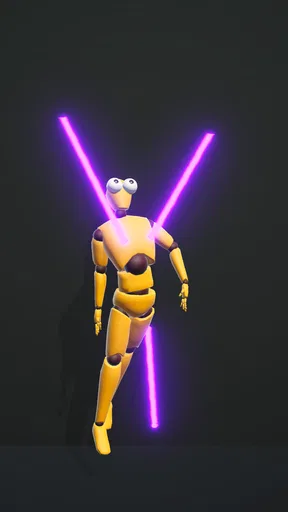
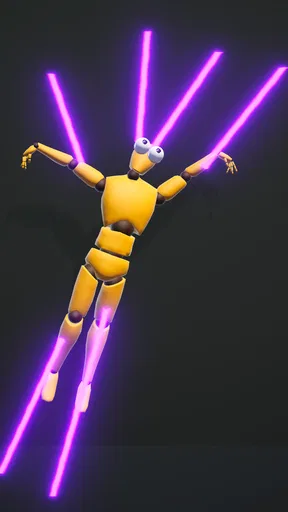
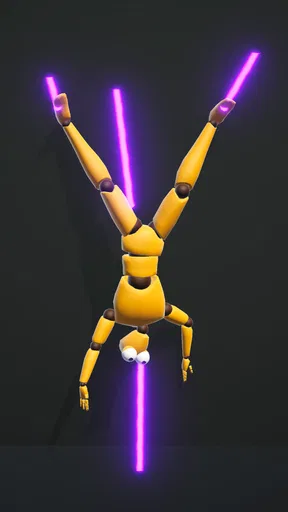
Elastic Playground:Ragdoll Fun is the sort of action game I open when I want a quick break rather than a long campaign. Its appeal comes from direct interaction: I pull, fling, and smash ragdolls with elastic movement, then watch the physics produce results that are often more entertaining than the original plan. There is no complicated story to learn before playing, so I can understand the basic idea almost immediately.
That simplicity is also the main reason I would recommend it selectively. This is best approached as a casual physics toy with game-like challenges, not as a deep action adventure. I enjoyed the short sessions and the satisfaction of finding a better angle, but anyone looking for detailed progression, strategic combat, or a substantial narrative may run out of reasons to return sooner than expected.
What playing it actually feels like
Developed by KAYAC Inc., this free action game focuses on the physical behavior of its ragdolls and the elastic force behind each movement. The controls are easy to understand, yet the outcomes are not always perfectly predictable. A small change in where I pull or how I release can send the character in a completely different direction, which gives ordinary interactions a playful trial-and-error quality.
I found that the best sessions were not about rushing. The game rewards watching the scene for a moment, identifying where the ragdoll needs to go, and then choosing a useful starting point for the stretch. When I treated every attempt as a small physics puzzle, the experience felt more satisfying than when I simply dragged wildly across the screen.
The store summary describes the central loop accurately, but it does not explain the practical difference between a successful attempt and a frustrating one. The important skill is learning to use the elastic movement as a controlled launch rather than treating it like a simple swipe. Pulling farther is not automatically better; timing and direction matter just as much.
That makes the game suitable for short breaks during a commute, while waiting for an appointment, or after finishing a task. I can play for a few minutes without needing to remember a complicated plot or rebuild a strategy from the previous session. At the same time, the physics can encourage repeated attempts when I feel that the last result was close to working.
Where new players are most likely to get stuck
The first point of friction is usually control interpretation. A player may expect a normal action game in which a tap triggers a fixed move, but the elastic interaction is more dependent on gesture direction and release. If a ragdoll keeps missing the intended area, I would first change the angle and release point instead of assuming the level is unfair.
Another common problem is overcorrecting. When a launch fails, it is tempting to make the next pull much stronger. That can create an even less useful trajectory. I had better results by changing one variable at a time: first the starting position, then the direction, and only afterward the amount of stretch.
Small screens can make precision harder, especially when the scene contains several objects close together. My practical approach is to keep my finger movement deliberate and avoid beginning a gesture at the edge of the display. A rushed swipe can make the game feel unresponsive when the real issue is that the intended interaction was too crowded or too fast.
There is also a mental adjustment involved. Physics-based games rarely behave like scripted action titles. A ragdoll may rotate, bounce, or land in an unexpected way, and that unpredictability is part of the appeal. If I expect every attempt to follow a perfectly repeatable animation, I become frustrated quickly. If I view the result as feedback, I learn the controls more naturally.
Setup checks before blaming the game
Installation is relatively accessible because the game is free and supports Android devices running version 6.0 or later. It has reached over 10 million installs, and its average rating is 4.4 from around 16 thousand ratings, so it is clearly designed for a broad mobile audience rather than a narrow group of specialist players. Its content rating is Teen, which is worth keeping in mind before handing the device to a younger player.
Before playing seriously, I would check that the device is using the current available release, version 1.1.5. Updating is a sensible first step if controls behave inconsistently or the game does not open normally. I would also close demanding apps running in the background, particularly on an older phone, because physics interactions can feel less comfortable when the device is already busy.
A clean restart can help distinguish a temporary launch problem from a repeatable game issue. I normally force myself to test the game again after reopening it rather than changing several settings at once. That simple habit makes it easier to identify whether the trouble came from the session, the device, or the interaction itself.
Touchscreen condition matters more here than it might in a turn-based game. A screen protector with poor touch response, damp fingers, or a damaged section of the display can make dragging and releasing feel unreliable. If only one area of the screen seems troublesome, I would test other apps that use dragging before concluding that Elastic Playground is responsible.
I would also avoid judging performance from the first few seconds after launching. Phones sometimes need a moment to settle after opening a game, especially when several applications have recently been used. If the experience remains uneven after a restart and with other apps closed, then the device may simply be a poor fit for smooth physics play.
A reliable way to recover a failed attempt
When a move goes wrong, I use a short recovery routine. First, I observe where the ragdoll actually traveled instead of focusing only on the intended destination. That tells me whether the problem was too much force, a poor angle, or a release that happened earlier than expected.
Next, I repeat the attempt with a modest adjustment. Moving the starting point slightly can have a bigger effect than pulling harder, because the initial line of travel changes. This is one of the more useful lessons in the game: precision usually beats exaggerated movement.
If the scene becomes visually confusing after several attempts, I pause my own input by simply taking a breath and resetting my approach. Repeated frantic gestures make it difficult to tell what changed. A slower rhythm gives me clearer feedback and reduces the chance of accidentally beginning the next pull from the wrong place.
For a difficult section, I would use a two-stage method. I first aim for a safe, repeatable movement that shows how the ragdoll reacts. Then I adjust toward the actual objective. This may take an extra attempt, but it is more efficient than repeatedly making large guesses with no consistent reference point.
It is also useful to separate control learning from performance expectations. During the first few sessions, I would focus on understanding the elastic response rather than trying to complete everything quickly. Once the movement feels familiar, the same scenes become less random because I can predict the rough effect of a gesture.
When the phone or connection is the real problem
If the game suddenly closes, freezes, or feels unusually slow, I would not immediately assume that a particular level is broken. I would restart the app, check available storage, and close background applications. These are general device checks, but they are especially relevant to a game where movement and collisions need to be displayed continuously.
If the issue appears only after the phone becomes hot, taking a break and allowing the device to cool is more sensible than repeatedly reopening the game. Heat can affect overall responsiveness, and continuing to test under those conditions may give a misleading impression of the game’s normal behavior.
Network conditions may also confuse troubleshooting. A player might associate a loading delay with the game itself when the wider connection is struggling. I would compare the behavior with another app that needs online access and try again later. I would not change multiple account or device settings without a clear reason, because that can create new problems while hiding the original one.
Storage is another practical check. Even a free game needs room for installation and routine device operations. If the phone is nearly full, clearing unused files or applications can be more useful than reinstalling immediately. Reinstallation should be a later step, not the first response, because it may remove local progress depending on how the game handles saved information.
That last point is important for anyone considering a reinstall: I would make sure I understand what may happen to local progress before deleting the app. A clean installation can solve damaged files, but it is not a harmless experiment if previous progress is stored only on the device.
How it compares with familiar action alternatives
Compared with conventional mobile action games, this one is much less about memorizing attacks or managing a character build. There is no need for me to learn a large set of buttons before I can participate. The main challenge comes from manipulating motion, which makes it approachable for players who enjoy experimentation more than combat systems.
Compared with puzzle games, however, the results are less exact. A traditional puzzle often gives me a clear rule and a predictable solution. Elastic Playground gives me a physical response that can be influenced by gesture quality, so two attempts that look similar may not produce identical results. That creates charm, but it can also feel imprecise to someone who wants strict logic.
It also differs from endless runners and reflex games. Those alternatives usually test speed, timing, and rapid reactions over a continuous run. Here, I get more value from studying a situation and making a controlled launch. If I want a game that keeps my attention through constant movement, a runner may be a better choice. If I want a compact experiment where the movement itself is the entertainment, this is more distinctive.
The trade-off is depth. A larger action title may offer more variety, stronger long-term goals, and a richer sense of progression. This game’s advantage is that it does not demand that kind of commitment. I can enjoy it without investing a long evening, but I should not expect the same breadth as a premium-scale action experience.
Who will get the most from it
I would recommend it to players who enjoy physics toys, playful ragdolls, and discovering how small input changes affect a result. It works particularly well for someone who wants a free game that can be understood quickly and revisited in short sessions. The Teen content rating should guide family decisions, and I would not treat the simple presentation as a reason to ignore that label.
It is also a good fit for people who like informal challenge. The satisfaction comes from improving a movement, finding a cleaner route, or watching an unexpectedly funny collision. You do not need to be highly competitive to appreciate it; curiosity is more important than perfect reflexes.
On the other hand, I would skip it if my priority were a story-driven adventure, a deep progression system, or highly precise competitive controls. Players who dislike trial and error may find the physics unpredictable rather than enjoyable. Likewise, someone with an older or poorly responsive touchscreen may not experience the game at its best, even if the operating system meets the minimum requirement.
A realistic everyday use case is a short waiting period when I have enough time for a few attempts but not enough for a full mission in a larger game. I can open it, experiment with a movement, and put it away without losing the thread of a narrative. That convenience is more important to me than having a long list of systems to manage.
Small habits that make sessions better
I get more consistent results when I keep my finger movement smooth rather than jerky. I also try to begin each attempt from a similar position when comparing two techniques. That turns random experimentation into a simple personal test, making it easier to understand whether a change actually helped.
Another useful habit is to watch the landing area before pulling. The obvious target is not always the best place to aim first. A surface that allows a bounce or a safer contact may create a better follow-up position than a direct, forceful launch. This is where the game becomes more thoughtful than its playful appearance initially suggests.
I would avoid playing with a greasy or wet screen. That sounds minor, but the game’s central interaction depends on a clean drag and a clear release. Wiping the display and using a comfortable grip can improve control more than changing the way I think about the level.
Finally, I would stop after a few unproductive attempts and return later if I notice myself repeating the same gesture. A short break often helps because the problem may be my unchanged assumption rather than the level. Coming back with a different angle is more productive than adding force to the same failed idea.
My practical verdict after using it
Elastic Playground:Ragdoll Fun succeeds because it turns a very small control idea into a surprisingly engaging playground. KAYAC Inc. keeps the entry point simple, and the free-to-play format makes it easy to try without a purchase decision. The current version, 1.1.5, is the one I would use when assessing the experience, especially if an older installation has begun behaving strangely.
My main reservation is that the same physics that make the game amusing can make it feel inconsistent. Some players will enjoy learning through experimentation; others will want clearer control and more predictable outcomes. The game also asks for patience with touchscreen gestures, so a device with poor touch response can turn a pleasant break into unnecessary frustration.
Overall, I would keep it installed as a lightweight action game for short, low-pressure sessions. I would choose it over a conventional action title when I want to play with movement rather than manage a complex character. I would choose a deeper action game or a precise puzzle game when I want a stronger long-term structure or exact solutions.
For the right player, the best reason to try it is not the promise of a large adventure. It is the immediate pleasure of pulling, releasing, and seeing what happens, followed by the quieter satisfaction of learning why the result happened. If you enjoy playful physics and do not mind a little trial and error, this is an easy free download to recommend.
Verdict
Strengths of Elastic Playground:Ragdoll Fun
- Simple controls make it easy to start experimenting with ragdolls.
- Physics interactions create amusing and unpredictable moments.
- Sandbox format encourages open-ended play without strict objectives.
- Runs well for short sessions when you want a quick distraction.
- Different objects and setups add variety to experiments.
Limitations of Elastic Playground:Ragdoll Fun
- Gameplay can become repetitive after extended play.
- Some physics reactions may feel inconsistent or overly chaotic.
- Limited progression may disappoint players seeking goals or rewards.
- Ads may interrupt play or require patience between experiments.
- Small screens can make precise object placement difficult.
Other Releases by KAYAC Inc.
View All
Ball Run 2048: merge number
Casual4.1

Number Master: Run and merge
Action4.4

Type Spin: alphabet run game
Racing4.5

Draw Action: Freestyle Fight
Action4.3
Similar Picks in This Category
View All
Temple Run 2: Endless Escape
Imangi Studios4.1

PUBG MOBILE
Level Infinite4.3

Free Fire: 9th Anniversary
GARENA INTERNATIONAL I4.4

Talking Tom: Hero Dash Run
Outfit7 Limited4.3

slither.io
Lowtech Studios3.9

Sniper 3D:Gun Shooting Games
Wildlife Studios4.6
Frequently Asked Questions
What is Elastic Playground: Ragdoll Fun?
Elastic Playground: Ragdoll Fun is a physics-based sandbox game focused on experimenting with flexible ragdoll characters and interactive objects. Instead of following a traditional story or completing a fixed set of missions, you can place characters, test different tools, create amusing scenarios, and observe how the game’s physics react. It is mainly designed for casual entertainment, experimentation, and short play sessions.
How do you play Elastic Playground: Ragdoll Fun?
Gameplay is based on selecting ragdolls, objects, and environmental elements, then arranging them on the playground. You can interact with the characters, move them around, and test how they respond to impacts or other objects. The experience is open-ended, so there is no single correct way to play. Most of the enjoyment comes from creating unusual situations and discovering unexpected physics reactions.
Is Elastic Playground: Ragdoll Fun suitable for children?
The game is simple to understand because it relies on tapping, dragging, and experimenting rather than complicated controls. However, parents should review the age rating and store description before allowing younger children to play. Ragdoll physics can include cartoon-style falls, collisions, or exaggerated reactions that may not appeal to every child. Advertising, purchases, and privacy settings should also be checked on the device.
Does Elastic Playground: Ragdoll Fun require an internet connection?
The core sandbox experience may be playable without a constant internet connection, which makes it convenient for offline entertainment. Nevertheless, some features can depend on connectivity, including advertisements, optional content, updates, cloud-related services, or store purchases. Availability may also vary between Android and iOS versions. For the most accurate requirements, check the current listing for your device before downloading.
Is Elastic Playground: Ragdoll Fun free to download?
Elastic Playground: Ragdoll Fun can generally be downloaded without an upfront purchase, but the free version may include advertising or optional in-app purchases. Before installing, review the store page for details about paid items, subscriptions, and whether an ad-free option is available. If children use the device, enabling purchase restrictions is recommended, since sandbox games can encourage repeated experimentation and longer play sessions.
Play our best games!


